How I designed and built an enterprise grade AI library
Why shared AI libraries fail and what good ones do differently
The same problem kept getting solved over and over
Our organisation was adopting AI fast, and the work that made it useful was almost impossible to reuse. Good context sat in people's chat histories. Process knowledge that had taken someone weeks to work out sat in personal documents and in Confluence pages that were findable in theory and invisible in practice. People do not browse documentation hoping to stumble on something that might help with the task in front of them, and you cannot search for a thing when you have no idea it exists.
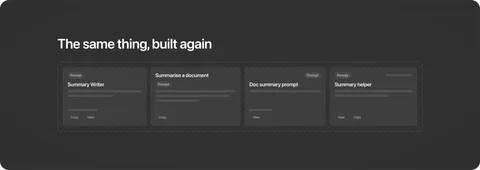
We were not short of sharing either, and that turned out to be part of the problem rather than the fix. Someone would demonstrate a pattern at a knowledge share, but people would still go away and rebuild it for their own team's context. The same capability ended up existing multiple times over, in slightly different shapes.
Nobody was hiding anything. What didn't exist was a shared pattern for building something another team could actually pick up and use. So people built for their own situation, and the repetition followed from that.
I led our AI champions network, so I took this on. The champions shaped it with me and tested it as we went.
Libraries fail on their UX and not their content
Shared libraries had been tried here before and never taken hold. It is tempting to blame the material, but the material is often not the problem. What kills these things is the experience of using them.
We learned by doing. As we used the early versions, the same problems kept surfacing. People couldn't tell what a prompt was for. Assets were built too specifically for one person's context, so others couldn't use them. And knowledge was organised by team instead of by what someone was trying to do.
So we stopped letting teams decide where knowledge lived and started organising around what someone is trying to do. That small decision made everything that followed possible.
Nobody could tell what a prompt was for
The earliest version was very simple. We put a prompt on a page and left it there. I went to use one myself and could not work out what it was for or when I would reach for it. The name on its own told me nothing. Other people were running into the same thing.
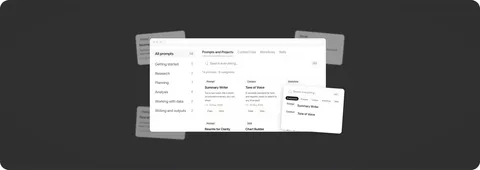
What was missing was never the prompt itself. It was everything around it. So we gave each asset a clear description, a stated use case, and links to related items. This pattern ended up applying to everything in the library.
It also exposed a deeper version of the same problem. People were writing context directly into prompts, locking it to that one asset, when a single piece of context like a company's tone of voice is useful across many prompts and many chats. So context files, workflows and skills each became their own collection: different jobs, designed to work together.
Where does AI actually belong?
The library was filling up with things that helped you use AI, but almost none of it told you when to use it. People don't stop mid-task to wonder if a tool exists for what they're doing.
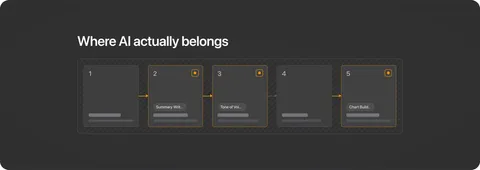
So we started documenting the actual work itself. Once the steps were written down, we could point to exactly where AI belonged. This turned the documentation into a place where people discovered AI at the moment they needed it, rather than somewhere they filed it afterwards.
It also showed us where AI did not belong. The instinct is to automate the whole job. I watched that fail at Quantium, where we automated processes end to end and people simply stopped using them. Writing the work down first avoids that trap. Some steps should stay manual, and once that's visible, you can put AI only where it genuinely earns its place.
Humans are going to be human
No amount of training changes the fact that people use a system the way they want to use it. That is not a criticism, it is a design constraint.
People build for the job in front of them. That is reasonable, and it is quietly expensive. An asset built for one person's exact context is rarely usable by anyone else, so they rebuild it. Those specifics belong in a context file layered on top, not baked into the asset itself.
The second issue appeared once people started improving each other's work. A well-intentioned fix in one place would quietly break something else. We solved that with versioning and change logs, so people could see what changed and roll back when needed.
People won't contribute if it's hard
Contributing properly took too many steps. We had documented the workflow, but it was correct rather than easy. Most people didn't bother, and the submissions that did come in still needed a champion to clean them up.
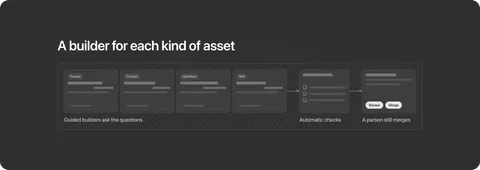
So we automated the painful parts. We built a guided builder for each type of asset that asks the right questions and produces something correctly structured. We also added a validator that checks for common issues before anything gets submitted. This removed the heavy lifting from contributors and shortened the review process for champions. A human still reviews and merges everything, because that gate is where the trust comes from.
A technical solution for non-technical users
Skills forced a decision we had been avoiding. A folder of files couldn't live in a documentation tool, so the library had to move somewhere that could hold them.
GitHub solved the technical problem, but it introduced the biggest risk in the project. It's a technical tool, and moving the library there threatened to alienate exactly the people it was built to help.
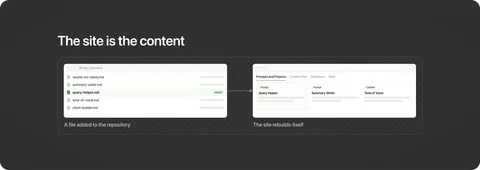
The breakthrough was GitHub Pages. It builds a website directly from the repository, so the site is the content. Putting a file in the repository and watching the website update itself was genuinely something to witness. Nobody had to touch the underlying machinery. You just added a file, and the site took care of the rest. This approach was designed to work for the people who live in a repository and the people who never wanted to open one.
Key learnings
Map the real workflow before adding AI. The instinct is to automate the whole job, but that's a reliable way to get people to abandon what you built. When some steps can't be automated well, the whole process collapses. You need to map out how the work actually gets done before you decide where AI belongs.
People won't go looking for AI. They discover it only when it appears at the exact moment they need it. That means clear descriptions, stated use cases, and placing AI inside the actual workflows.
Contribution must be nearly frictionless. If adding something back is too much work, people simply won't do it. The library stops growing, and the same work starts getting repeated again.
Treat a shared library as a product. The material is often not the reason these things fail. Finding it, knowing whether it applies, and the cost of adding to it are what decide whether it lives or dies.
Conclusion
An AI library is only ever as good as the experience of using it. Two things decide whether it succeeds or fails. Can people tell, in the middle of their actual work, that something in the library would help them right now? And can someone who has built something useful add it back without too much effort?
Get both right and the library compounds. People who get value from it contribute back, making it more valuable for the next person. Get either one wrong and the quality of the material stops mattering.